Sunday, June 9, 2013
Zoidberg : Control via a PS3 controller

Sunday, June 2, 2013
Zoidberg : IK based walking
With some wrangling of the existing code base, I have gotten basic IK walking working. These servos have a higher resolution than the ones that the code was originally written for. I think now I will do a little bit of physical optimization, perhaps some reworking of existing parts. Then work on further software tuning.
Two gaits are shown a basic ripple gait and a smooth ripple. The smooth version has more steps per cycle.
Monday, May 27, 2013
Zoidberg : Sequenced Motion

And now begins the "complicated" part, teaching the robot to walk. I have been working for a little while to get an existing code base to play nicely with my mechanics. I have made some progress, but not enough to get the robot to walk with a gait generated in real time.
One very nice feature of the servos used for this project is that I can shut the torque off to them, and pose them. I can then read the pose position with a connected PC, and then play back that sequence. Sort of like stop frame animation. This crawl gait was generated that way, with approximately 15 separate poses.
More work is needed with the other software. It is capable of mathematically generating positions of each leg for movement, altering step lengths and such dynamically.
Sunday, May 19, 2013
Zoidberg : Significant Steps

In the last post I showed some parts that I designed to be cut out of thicker material, primarily to allow for the tab that remained to be tapped. Due to some unforeseen circumstances with the mill, I scrapped several sets of these parts. Partly as a result I redesigned the parts to be cut from thinner sheet. The tapped holes were moved to the mating part, which simplified construction.

Parts are now cut from .080" or approximately 2mm thick aluminum sheet. I used a heat activated clamping compound to hold the parts to a backup plate. This lets me cut around the perimeter without worrying about holding the part from the sides. Since the sheet is kept flat, it's easy to put a consistent chamfer around all exterior edges of the parts.

Here are the parts which make up the frame for the "body" of the robot.

Action shot.

Here are all of the parts which make up a single leg. The two thicker parts are milled from 1/4" thick aluminum. I'm not entirely happy with these, they will be the first parts that I remake. They will be functional for now, but they need some refinement.

And here is the leg assembled. I may play a bit with servo orientation, I'm not positive that this is the final arrangement.


And the robot mainly physically assembled. Nothing is wired and none of the servos have had their ID's set up. I also still need to cut a plate to mount the Arbotix board to.
Sunday, May 5, 2013
Zoidberg : First Parts
I have wanted to build a quadruped robot for a long time. I have done a number of different simpler hex configurations for fighting robots, but nothing higher than 2DOF. I had started planning many times based on hobby servos, and I have a rather large box of them from other projects, but their inherent shortcomings for robot use made me think twice about spending the money on ones suitable for the design I wanted. I considered modding my own with better control and position sensing, but scrapped that as well due to time and cost. Then I found out about the Robotis MX line of servos It was pretty much the servo I would build, only someone else has already done the work for me.
Zoidberg will be a 3DOF quad using MX28's. I have worked out an initial design for the legs, and I'm still tweaking the body and frame design. Control will initially be an Arbotix board with XBEE's. I want to set up a PS3 controllers with my laptop and an XBEE to send commands, still looking through what exactly I need to do this. Future goals include getting some type of vision system working on it with landmark assisted navigation.


Zoidberg will be a 3DOF quad using MX28's. I have worked out an initial design for the legs, and I'm still tweaking the body and frame design. Control will initially be an Arbotix board with XBEE's. I want to set up a PS3 controllers with my laptop and an XBEE to send commands, still looking through what exactly I need to do this. Future goals include getting some type of vision system working on it with landmark assisted navigation.

Here is the design for the coxa of the robot. It is an assembly of 5 parts, the center plate and 4 identical arms which bolt to the center plate. I will begin with the arms. There are more of them than any other single part in the robot.

To begin with, I squared up the stock and brought it to an overall thickness of 6mm. I used 1/4" thick nominal aluminum extrusion, which allowed me to take a few thousandths off each side.

Indicating the center of the part. I like to work from the center as it allows me to keep everything even throughout the machining process. The first feature put into the parts will be the tapped holes that bolt everything together. It's easiest to do this now while the whole part is square rather than later on when more stock is removed.

Here we are all drilled and tapped.
Wednesday, December 26, 2012
Finished Star Clock


Here is the finished Star Clock. We did a little modification of the code as the 1hz pulsing of the points proved a bit distracting. It's kind of hard to see in the pictures here, but the points begin as purple and fade over to blue, 1 per minute. When all five points are blue, the minute hand kicks over another 5 minutes.
A couple of further tweaks are planned, a shift of the clock face itself in color from a.m. to p.m. With the RTC chosen it's even possible to make the clock change colors on a particular date. Also completely un-used (except to say Happy Christmas at the moment) is the 16x2 LCD display and navigation buttons mounted on the the back.
Tuesday, December 25, 2012
Making Kirstin's Christmas Gift
One more project to close out the year, a gift for my wife. She likes things that light up, and I have a "star" theme going this year. Perusing my favorite electronic supply sites I came upon these Adafruit addressable LED string. Very similar to a product I'd used in the past (Sparkfun BlinkM) but cheaper, and you don't need to set each unit's address.
It took me a couple of days to work out a concept to take advantage of the lights. What I would do is to make a clock with the LEDs changing color to indicate the position of the hands. 12 of the LEDs will make up the face, and then 5 additional ones will occupy the points of the star, pulsing to indicate seconds, similar to the way the light on my Macbook Pro pulses while sleeping.


It took me a couple of days to work out a concept to take advantage of the lights. What I would do is to make a clock with the LEDs changing color to indicate the position of the hands. 12 of the LEDs will make up the face, and then 5 additional ones will occupy the points of the star, pulsing to indicate seconds, similar to the way the light on my Macbook Pro pulses while sleeping.

To make the major portion of the clock I used a piece of white delrin plastic. This part is just slightly smaller than the table travel of the mill. Additionally both sides of the part need to be machined, which further complicates the setup and fixturing. To begin, I cut the holes in the back side of the clock to hold the LEDs. The 12 central holes are for the "hand" display, and the 5 peripheral holes for the pulsing star points. The large central cavity provides a convenient place to stash the RTC (real time clock) chip which keeps track of date and time with a battery backup. It will also come in handy for one of the next steps.

In order to cut the front portion I need to hold the part down, as well as know where it is in space, so that the two sides register correctly. This piece of delrin is cut to engage the central pocket and the "12 o'clock" LED hole. The large flat areas provide space for the double stick tape. I machine a lot of things with double sided tape to hold them down, it works very well, even more so when you have boss features like this fixture does to prevent any sideways movement.

Here is the part placed on the fixture and roughed out. I wanted the star to have rounded "puffy" look similar to the stars in more modern Mario games. I almost left the piece the way it looks here, I thought the topographic map effect was rather interesting, but the smoother look won out.


Here is the finished part. You can see the outline of the double stick tape used on the fixture block in the background. The 5 smaller holes in the back will let me mount the control electronics.
I still need to take a few pictures of the finished product. The software and colors need a bit of tweaking as well. More to update soon.
Sunday, November 4, 2012
Monday, October 29, 2012
Wedding Bands


Here is the project I have been working on for a while. It's the reason I needed 4th axis support in the first place. These are the wedding bands for Kirstin and I. They are made from Titanium. The profile of the band itself was cut on the mill, and then the knot work and constellation art was engraved into the surface. The final step is to polish out the surfaces, first using sandpaper, and then progressing to various grades of lapping paste (silicon carbide grain mixed with oil) applied with a hard felt buff.
These pictures show the knot work common to both rings, and we put the constellation for each others birth months on the part closest to the hand. These still need one final level of polish, and they will be complete.
Friday, October 12, 2012
Finished Amulet

Kirstin mixed a little paint to add an older weathered and worn look, and a piece of oven bake modeling clay was used to form the "gem" in the center. Clear drying craft glue adds a bit of shine.
Thursday, October 11, 2012
Amulet Construction

To make the amulet shown below in CAD drawings I first start with a piece of 360 brass stock. It is held to the plate below with a layer of paper and wax based adhesive. This can be applied or removed with just over 200 degrees fahrenheit, easily supplied by a hot plate. This has the advantage of not having to be pried off like double stick tape. It allows you to cut all sides of the part free without additional clamping.

The first program cuts the outside of the amulet profile and the center pocket for the gem. This cut is made with a square end mill.

The second program roughs out the 3 dimensional contours of the part. I use a 1/8" diameter ball end mill. It leaves a minimum of .007" of an inch everywhere on the part to allow for a finish cut. This cut took approximately 20 minutes to make, and removed the bulk of the material. Although the cut is shiny, the detail does not match the model very closely.

The finish cut is made with a 3/64" ball end mill. The tool moves in a spiral from center to outside. Each arm of the spiral is .0015" apart. It moves up and down at the same time to form the contours of the part. This cut takes much longer to make (~2hrs) but produces the fine finish seen here. The part and plate it was resting on were returned to the hot plate and separated.
Saturday, October 6, 2012
Setup And Testing

By cutting 4 faces at 90 degrees I can measure to the center of rotation, and set the center of the system to the center of the rotary table. In this picture I am starting to "turn" down some of the excess wax to make a cylinder. The wax is entirely recyclable, it can be remelted and re-poured at a little over 200F. It doesn't wear tools either making it perfect for testing out unproven complicated programs.
In this video I have "turned" the cylinder down further and I am engraving a pattern on the outside. It's a very simple knot work pattern. The final project may evolve this style a bit. Again Alibre is a bit different than other software I am used to. I need to work with the rotary axis post/setup to get the output that I want. Currently I don't have things working so rotary feed is output correctly. Everything is correct, but I had to trick the system into moving this fast.
Here is a close up of the result.

Tuesday, October 2, 2012
Blam-o!


Sunday, September 30, 2012

Saturday, September 29, 2012
4 Axis Mill Model

The main reason to do all this work is to finish the design and installation of homing switches. With smaller stepper based system, these are not required for a mill without a tool changer. I am working on a tool change system, manual at first, and later automated, so the switches will be needed.
Friday, September 28, 2012
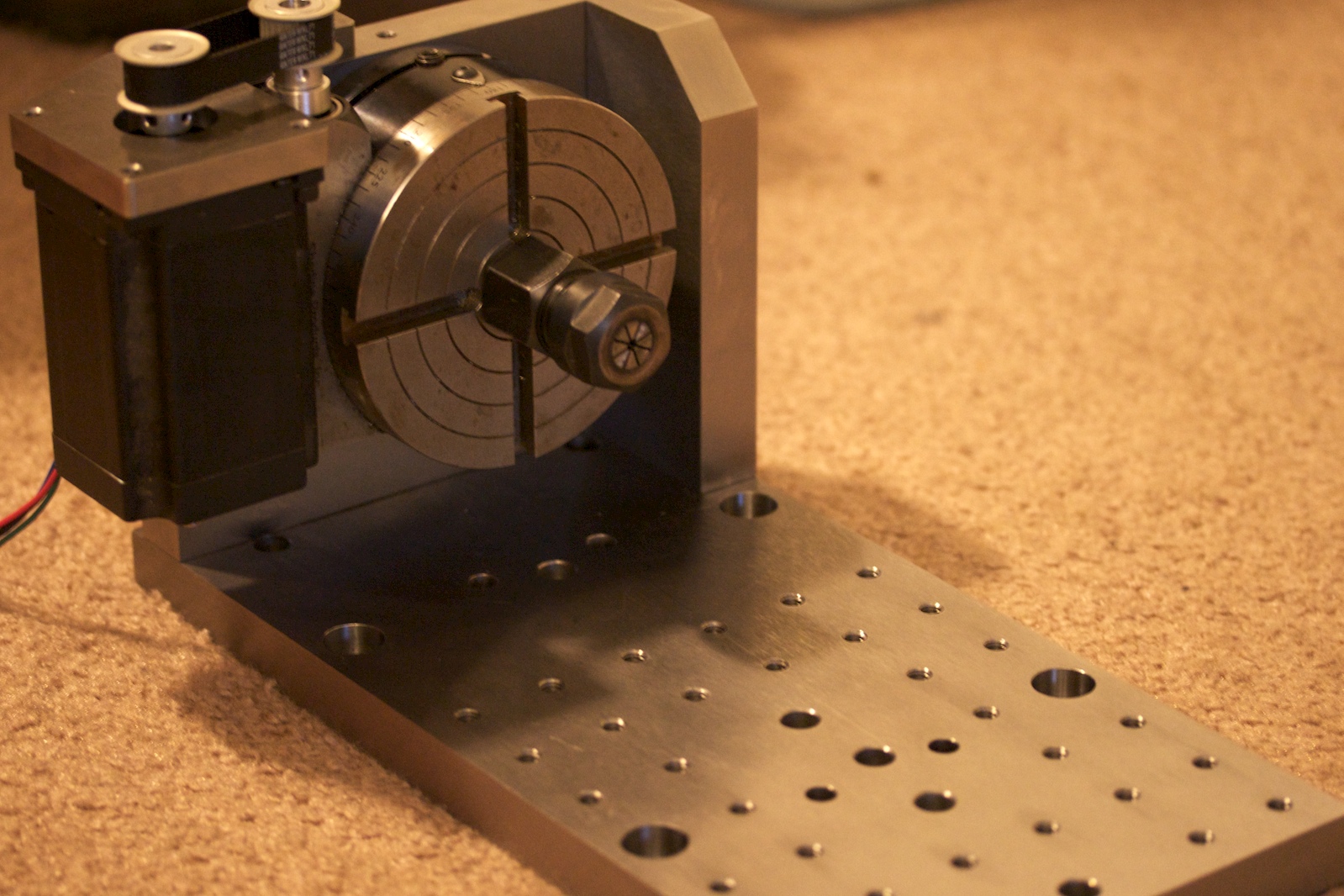

Finishing up some work on the 4th axis setup for the milling machine. This was also designed in Alibre (along with entirely remodeling the entire milling machine, a story for another post). This will allow controlled rotation of a workpiece parallel to the X axis of travel. One can reach more sides of a part with a greater variety of cutters. It can also reduce the amount of different setups required to make a single part, saving time and difficulty. I purchased the rotary table some time ago for use with a manual milling machine. The standard mounting for a stepper motor will not fit this design, so I constructed my own using a bracket and some timing belts. Here the rotary table is shown with a collet setup, which allows holding work up to 3/8" in diameter. A larger capacity chuck is on it's way to hold larger work, as well as non round parts.
A matrix of holes was drilled in the table opposite the rotary table to allow the use of optional accessories such as a tailstock for work support, or to simply use to mount additional vises or fixturing. One more part still needs to be fabricated, a sheet metal cover to protect the belt and pulleys from chips and debris. Although this part does not require high precision to work well, I am curious to see how Alibre's sheet metal design translates into real parts.

This plate aligns the table shown above with the base of the mill table. It allows me to either mount this table setup, or an alternate one with a vise. The dowel pin holes control the alignment so that each one is mounted in the same location it was last. Flanking each dowel pin hole are two tapped holes. These holes hold longer set screws which are used to raise this plate off the dowel pins. This entire setup weighs close to 40 pounds so the screws enable easy removal without damage or injury.
The same interface will also be used when making a table for working with larger sections of flat stock.
Wednesday, September 5, 2012

Saturday, September 1, 2012


Wednesday, August 29, 2012


This weekend I hope to draw up the center portion of the quad, basically an "X" shape that will hold the arms, control board, and underneath it, the flight battery.
I still have to modify the brushless speed controllers as well. More on that when I get to that stage.
Thursday, August 23, 2012
MQX Brushless Motor Mount


Subscribe to:
Posts (Atom)